Showing posts with label drivers. Show all posts

Wednesday, June 25, 2014

0 HCL ME Laptop 1065 Drivers and Details

There are 2 sets of drivers released by TAC (technical Assistant Centre) and HCL Support Division. I will list out both link. So basically these are the common name for HCL ME Laptop 1065 Series:

HCL ME Laptop 1065 Series
HCL ME Laptop L 1065 (Calder)
HCL ME ICON L 1065 B
HCL ME Laptop ICON L 1065 B

Compatibility:
Windows 7 32-bit, Windows 7 64-bit, Windows 8 32-bit, Windows 8 64-bit
Windows 8 drivers can be use for windows 8.1.

Drivers


  • On HCL Support server this drivers listed under HCL ME Laptop L 1065
  • Please Install according to the order.
Chipset
Intel Chipset Installation Utility (Intel HM76 , 7 Series)
Windows 7 (32/64-bit): Download
Windows 8 (32/64-bit): Download

MEI
Intel Management Interface Driver
(not listed on Technical support site, but older HCL server provide this driver)
Select base on your operating system :  Download

IRST
Intel Rapid Storage Technology Driver
Windows 7/8 (32/64-bit): Download

Graphic
Intel HD (4000) Graphic Driver With Intel Core i5 3rd Generation.
Windows 7 (32/64-bit): Download
Windows 8 (32/64-bit): Download

Hotkey
Drivers for Quicklaunch and Keyboard
Windows 7 (32/64-bit): Download
Windows 8 (32/64-bit): Download

Audio
HD Audio Drivers (Normally HCL use Realtek)
Windows 7 (32/64-bit): Download
Windows 8 (32/64-bit): Download

LAN -Ethernet
Realtek FE/GBe (RTL6139/8168/8169)Ethernet Controller
Windows 7 (32/64-bit): Download
Windows 8 (32/64-bit): Download 

Camera
Integrated 2 Megapixel Camera Driver
Windows 7 (32/64-bit): Download
Windows 8 (32/64-bit): Download

Touchpad
Touchpad Drivers - Mouse Drivers (normally ALPS or Synaptic)
Windows 7 (32/64-bit): Download
Windows 8 (32/64-bit): Download

Combo Card - Wireless and Bluetooth
Realtek RTL8723ae Wireless Drivers and Realtek Bluetooth Drivers.
Windows 7 (32/64-bit): Download
Windows 8 (32/64-bit): Download

USB 3.0
Intel(R) USB 3.0 eXtensible Host Controller
Windows 7 (32/64-bit): Download
Windows 8 (32/64-bit): Automatic
( Before upgrade to windows 8, make sure to test compatibility first, if it mention USB 3.0 is not compatible, uninstall current driver on device manager, then perform the upgrade. Windows will automatically installed the compatible drivers during windows 8 installation process).

0 Mobile Intel® 4 Series Express Chipset Family Drivers and Details

Intel website only provide drivers for Windows XP, Vista and Windows 7, and for Windows 8 and 8.1 Intel tell users to download it from Windows automatic Update. So, if you are asking does Intel provide support for Windows 8/8.1 for this chipset? the answer is yes but you must use Windows Updates in order to install the drivers in Windows 8.

ReadMe First!
1. This driver will install both Graphic and Intel HDMI audio driver.
2. Mirror - If you prefer to download driver released from your notebook manufacturer.
3. Using the driver from Intel is strongly recommended.


Windows XP (32-bit):
Graphic Version : 6.14.10.5420 (14.42.15.5420)
File Name : winxp144215.exe
File Size :  17.35MB
Download Link : Download


Windows XP 64-bit:
Graphic Version : 6.14.10.5420 (14.42.15.5420)
File Name : winxp64_144215.exe
File Size: 39.26MB
Download Link : Download


Windows Vista and Windows 7 (32-bit) :
Graphic Version : 15.17.19.64.2869 (8.15.10.2869)
File Name : Win7Vista_151719.zip
File Size : 37.67MB
Download Link : Download


Windows Vista and Windows 7 (64-bit) :
Graphic Version :15.17.19.64.2869 (8.15.10.2869)
File Name : Win7Vista_64_151719.zip
File Size : 38.96MB
Download Link : Download


Drivers for Windows 8/8.1 x84/x64 (32 and 64-bit):
Drivers for windows 8 and Windows 8.1 only available through Microsoft Windows Update. You need to turn on Windows Update, check for updates and select the updates available for your graphic driver. Please reboot after installing the updates for changes to take place.

Advance : You can download the driver file manually from Microsoft Update Catalog and extract the CAB (Cabinet) file. Use manual Installation via device manager to install the driver.

Download Link :
 http://catalog.update.microsoft.com/v7/site/Search.aspx?q=Mobile%20Intel(R)%204%20Series%20Express%20Chipset%20Family

Supported Chipset
Drivers (Intel 4 series) package support the following graphic chipset:

Desktop Graphic:
-Intel(R) B43 Express Chipset
-Intel(R) G41 Express Chipset
-Intel(R) G43 Express Chipset
-Intel(R) G45 Express Chipset 
-Intel(R) Q43 Express Chipset 
-Intel(R) Q45 Express Chipset  

Mobile/Notebook Graphic.
-Mobile Intel(R) GL40 Express Chipset
-Mobile Intel(R) GM45 Express Chipset
-Mobile Intel(R) GS40 Express Chipset
-Mobile Intel(R) GS45 Express Chipset

Requirements :
1. Your computer should have at least 1GB System memory (RAM).
2. Using drivers with respected operating System.
3. Your system must contain one of the supported chipset mentioned earlier or contain the following Intel Chipset :
-Intel(R) Core(TM) i3 Processor Family
-Intel(R) Core(TM) i3 Mobile Processor Family
-Intel(R) Core(TM) i5 Processor Family
-Intel(R) Core(TM) i5 Mobile Processor Family
-Intel(R) Core(TM) i7 Mobile Processor Family

0 SMBus Controller Drivers and Fixes

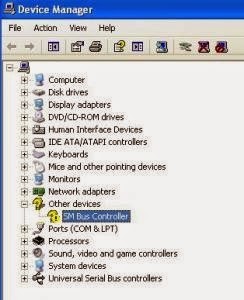
If you are having problem with SMBus (System Management Bus) driver which listed as not recognize in device manager, you can fix it by simply installing the right chipset drivers for your computer.


Do I need this drivers?
yes, it will increase your computer system stability and function. With System Management Bus, a device can provide manufacturer information, tell the system what its model/part number is, save its state for a suspend event, report different types of errors, accept control parameters, and return its status.

So, how to fix it?
You need to download and install the chipset driver because SMBus is part of the chipset component. To get the right chipset driver to fix your Sm Bus controller refer to the method below.

Method 1:
You can download it from your computer manufacture support website. Just go to the download site and select your model from the list and download the chipset drivers base on your current Operating system (Windows 7 etc).

Method 2:
There are 3 most common chipset used nowadays which are Intel, AMD and Nvidia. You can identify your chipset by looking at the SMBus Hardware ID. Search your hardware ID on Google and you will see the search result shows Intel, AMD or Nvidia Chipset.

Now after you know what type of chipset you have, download the latest chipset driver for your computer and install it. You can also use automatic detection tools to identify which driver you should use :

Intel Chipset : Automatically detect Intel SMBus/Chipset drivers
AMD Chipset : Install AMD automatic driver detection tools.
Nvidia Chipset : Automatically Scan Nvidia SMBus/Chipset drivers

Other Method
Run windows automatic updates to see if there are any available drivers update for your computer.

Not Recommended
2. You can use 3rd party software to identify missing and outdated drivers but I do not recommend to use this method because sometimes their update and drivers can mess up your system.

If you have problem installing your SMBus driver, just post your hardware ID in the comment section below and I'll provide the driver you need to download and install.
 
back to top //PART 2